
Problem: Facts of many hosts are missing in Foreman
Expected outcome: Facts should be displayed for all hosts
Foreman and Proxy versions: 3.17
Foreman and Proxy plugin versions: 3.17
Distribution and version: Ubuntu 22.04 LTS
Other relevant data:
I have a strange problem in that I can only see data such as CPU, RAM, and HDD for 6 hosts in Foreman. However, a total of 17 hosts are registered in Foreman. The facts are missing for the remaining hosts.
Puppet Agent 7.34 is installed on the hosts with Ubuntu 22.04 LTS installed.
Puppet Agent 8.10 is installed on the hosts with Ubuntu 24.04 LTS installed.
All these hosts were registered in the same way. As you can see in the screenshot, it is independent of the Ubuntu or Puppet version:

All hosts are in the same organization and have also been assigned the same location. Also environment (= production). In addition, they have their own certificates that were successfully issued by the Puppet server (version: 8.7).
The Puppet agent on the clients is configured as follows:
`[main]
certname = client2.company.com
server = testserver.company.com
ca = falsereport = true
reports = foreman
reporturl = https://testserver.company.com:8443/reportshostcert = /etc/puppetlabs/puppet/ssl/certs/client2.company.com.pem
hostprivkey = /etc/puppetlabs/puppet/ssl/private_keys/client2.company.com.pem
localcacert = /etc/puppetlabs/puppet/ssl/certs/ca.pem
crl = /etc/puppetlabs/puppet/ssl/crl
certificate_revocation = falseenvironment = production
logdir = /var/log/puppetlabs/puppet
rundir = /var/run/puppetlabs
vardir = /opt/puppetlabs/puppet/cache
rich_data = false[agent]
server = testserver.company.com
environment = production
report = true
reports = foreman
reporturl = https://testserver.company.com:8443/reports
runinterval = 30m
use_cached_facts = false
ignorecache = true
include_legacy_facts = false`
On the server, it looks like this:
`[main]
server = testserver.company.com
certname = testserver.company.com
codedir = /etc/puppetlabs/code
environmentpath = /etc/puppetlabs/code/environments
basemodulepath = /etc/puppetlabs/code/modules:/opt/puppetlabs/puppet/modules:/usr/share/puppet/modules
hiera_config = $confdir/hiera.yaml
logdir = /var/log/puppetlabs/puppet
rundir = /var/run/puppetlabs
ssldir = /etc/puppetlabs/puppet/ssl
vardir = /opt/puppetlabs/puppet/cache
pluginsource = puppet:///plugins
pluginfactsource = puppet:///pluginfacts
show_diff = false[agent]
environment = production
runinterval = 1800
splay = false
splaylimit = 1800
report = true
noop = false
usecacheonfailure = true[server]
certname = testserver.company.com
ca = true
autosign = /etc/puppetlabs/puppet/autosign.conf
node_terminus = exec
external_nodes = /etc/puppetlabs/puppet/node.rb
storeconfigs = true
storeconfigs_backend = puppetdb
reports = puppetdb,foreman
logdir = /var/log/puppetlabs/puppetserver
rundir = /var/run/puppetlabs/puppetserver
ssldir = /etc/puppetlabs/puppet/ssl
vardir = /opt/puppetlabs/server/data/puppetserver`
The server seems to have gotten the data it needs. I checked that with curl:

It looks good in the logs too:

I also tried to import the facts manually. But it didn’t work:
facter -p
sudo -u puppet /etc/puppetlabs/puppet/node.rb ``client2.company.com
facter --json > /opt/puppetlabs/server/data/puppetserver/facts.d/client2.company.com.json
foreman-rake puppet:import:hosts_and_facts[/opt/puppetlabs/server/data/puppetserver/yaml/facts]
When I run “puppet agent -t” on a host, the result looks like this:
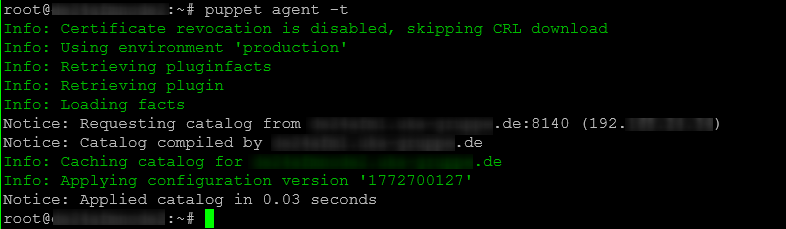
I don’t know what else to look for or what else to check.
I’ve been trying to find the cause for almost two months, but haven’t found any errors yet.
Does anyone have any ideas?