
Problem: Podman login fails until I give user admin role
Expected outcome: Podman login works with only Content Exporter/Importer role
Foreman and Proxy versions:
Fresh install with:
sudo dnf install -y https://yum.theforeman.org/releases/3.15/el9/x86_64/foreman-release.rpm
sudo dnf install -y https://yum.theforeman.org/katello/4.17/katello/el9/x86_64/katello-repos-latest.rpm
sudo dnf install -y https://yum.puppet.com/puppet8-release-el-9.noarch.rpm
Distribution and version: I use AlmaLinux 9.6
Other relevant data:
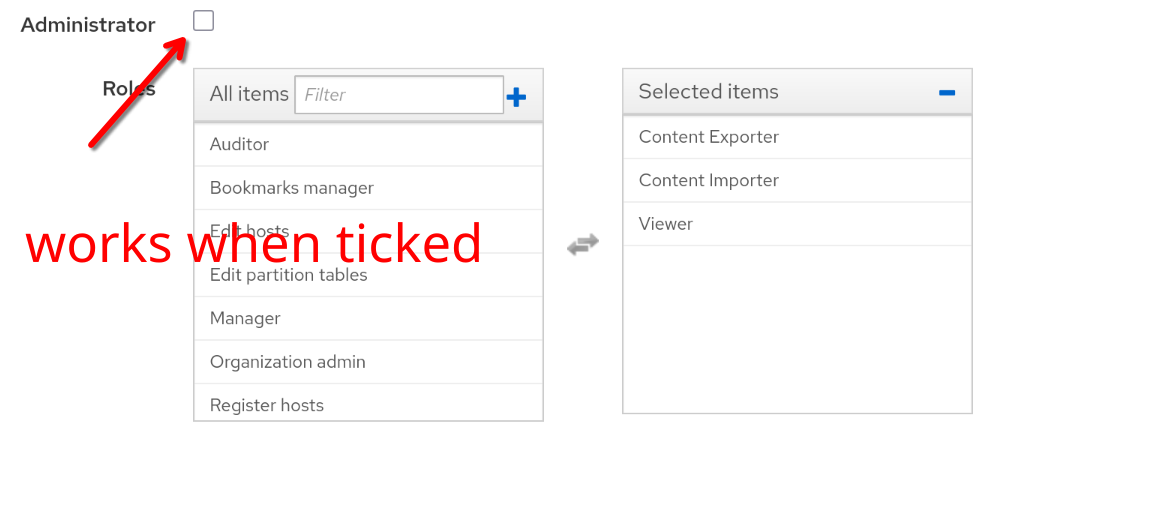
I have configured LetsEncrypt for Foreman.
I have created a product with a docker repository.
I have created a gitlab user access token and tried with this one as well (while keeping the username “gitlab” as before). Gitlab is an internal user.
podman login [redacted].quicksrv.de -u gitlab --log-level=debug
INFO[0000] podman filtering at log level debug
DEBU[0000] Called login.PersistentPreRunE(podman login [redacted].quicksrv.de -u gitlab --log-level=debug)
INFO[0000] Setting parallel job count to 25
DEBU[0000] Using conmon: "/usr/bin/conmon"
INFO[0000] Using sqlite as database backend
DEBU[0000] Overriding graph root "/var/home/rriemann/.local/share/containers/storage" with "/home/rriemann/.local/share/containers/storage" from database
DEBU[0000] Using graph driver overlay
DEBU[0000] Using graph root /home/rriemann/.local/share/containers/storage
DEBU[0000] Using run root /run/user/1000/containers
DEBU[0000] Using static dir /var/home/rriemann/.local/share/containers/storage/libpod
DEBU[0000] Using tmp dir /run/user/1000/libpod/tmp
DEBU[0000] Using volume path /var/home/rriemann/.local/share/containers/storage/volumes
DEBU[0000] Using transient store: false
DEBU[0000] [graphdriver] trying provided driver "overlay"
DEBU[0000] Cached value indicated that overlay is supported
DEBU[0000] Cached value indicated that overlay is supported
DEBU[0000] Cached value indicated that metacopy is not being used
DEBU[0000] Cached value indicated that native-diff is usable
DEBU[0000] backingFs=btrfs, projectQuotaSupported=false, useNativeDiff=true, usingMetacopy=false
DEBU[0000] Initializing event backend journald
DEBU[0000] Configured OCI runtime crun-vm initialization failed: no valid executable found for OCI runtime crun-vm: invalid argument
DEBU[0000] Configured OCI runtime runc initialization failed: no valid executable found for OCI runtime runc: invalid argument
DEBU[0000] Configured OCI runtime kata initialization failed: no valid executable found for OCI runtime kata: invalid argument
DEBU[0000] Configured OCI runtime ocijail initialization failed: no valid executable found for OCI runtime ocijail: invalid argument
DEBU[0000] Configured OCI runtime crun-wasm initialization failed: no valid executable found for OCI runtime crun-wasm: invalid argument
DEBU[0000] Configured OCI runtime runj initialization failed: no valid executable found for OCI runtime runj: invalid argument
DEBU[0000] Configured OCI runtime runsc initialization failed: no valid executable found for OCI runtime runsc: invalid argument
DEBU[0000] Configured OCI runtime youki initialization failed: no valid executable found for OCI runtime youki: invalid argument
DEBU[0000] Configured OCI runtime krun initialization failed: no valid executable found for OCI runtime krun: invalid argument
DEBU[0000] Using OCI runtime "/usr/bin/crun"
DEBU[0000] Loading registries configuration "/etc/containers/registries.conf"
DEBU[0000] Loading registries configuration "/etc/containers/registries.conf.d/000-shortnames.conf"
DEBU[0000] Found credentials for [redacted].quicksrv.de in credential helper containers-auth.json in file /run/user/1000/containers/auth.json
Password:
DEBU[0001] Looking for TLS certificates and private keys in /etc/docker/certs.d/[redacted].quicksrv.de
DEBU[0001] GET https://[redacted].quicksrv.de/v2/
DEBU[0001] Ping https://[redacted].quicksrv.de/v2/ status 401
DEBU[0001] GET https://[redacted].quicksrv.de/v2/token?account=gitlab&service=[redacted].quicksrv.de
Error: authenticating creds for "[redacted].quicksrv.de": Requesting bearer token: received unexpected HTTP status: 403 Forbidden
DEBU[0002] Shutting down engines
INFO[0002] Received shutdown.Stop(), terminating!        PID=11597